🚀 New — Built for Small Church Teams

Church Communication Software for Small Teams

Church communications software for small teams centralizes planning in one organized calendar. Teams can plan announcements, posts, and campaigns while seeing upcoming content, assigning owners, and keeping assets in one place. This approach helps small teams stay organized without juggling multiple tools or spreadsheets.

Short Answer: Church communications software for small teams centralizes planning in one calendar so teams can plan announcements, assign owners, and keep assets organized without juggling multiple tools.

Try It Free — Built for Small Church Teams
Simple tools made for small church staff
Keep announcements and posts in sync
One calendar for every communication channel

What is Church Communication Software for Small Teams?

Church communication software for small teams is a lightweight, easy-to-use planning tool designed specifically for churches with limited staff who need to organize announcements, schedule posts, and coordinate messaging without complex systems or overwhelming features. It provides a simple calendar interface where small teams can plan campaigns, draft content, manage approvals, and schedule across channels—all from one shared view. This type of software helps small churches communicate consistently and stay organized without requiring extensive training or multiple people to manage it.

Get started with our guide: How to Create a Church Communications Calendar (Step-by-Step Guide). For volunteer communication tips, see Volunteer Church Communications: How to Make It Work.

Church communication software for small teams is a lightweight planning tool designed for churches with limited staff who need to organize announcements and schedule posts without complex systems.

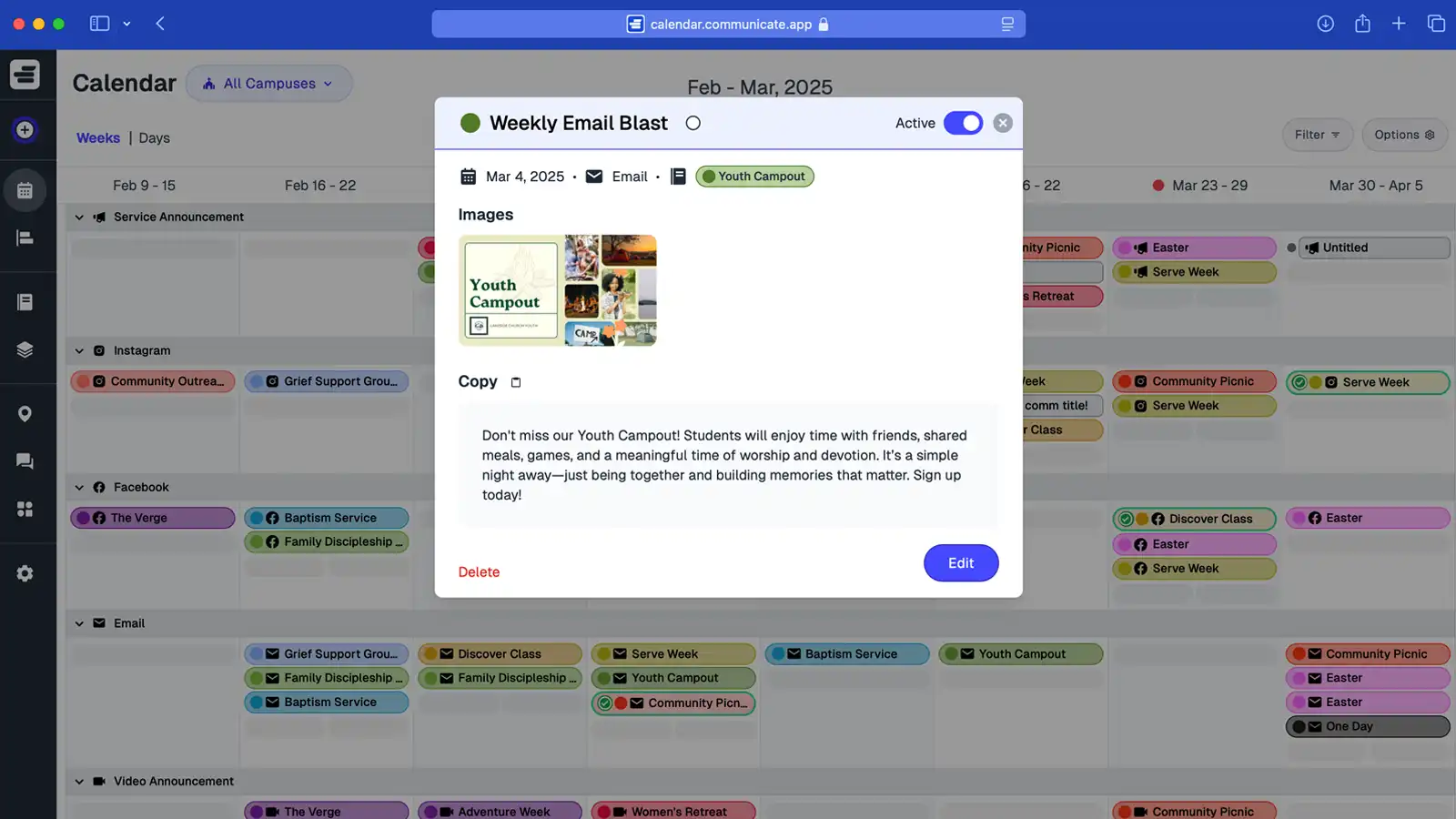
Screenshot of Communicate app small team calendar view

Simple Church Communication Tools for Small Teams

Communicate is the all-in-one small church communication software that makes planning easy for limited staff. Organize announcements, social posts, and ministry updates in one calendar—so every message is clear, consistent, and stress-free to manage.

Small church communication software provides simple calendar interfaces for planning announcements, social posts, and updates for limited staff.
Why Small Church Teams Struggle with Communication

Small staff often juggle multiple roles, leaving church communication reactive, scattered, and hard to keep up with. That’s why Communicate was built—to give small churches the right tools to stay organized without adding more complexity.

Limited Staff Bandwidth

Small teams can’t manage bulky systems or endless spreadsheets. A lightweight church communication tool keeps planning simple and doable for any staff size.

Disorganized Messaging

Without a central calendar, announcements and posts overlap or get forgotten. Communicate keeps every update aligned in one shared plan.

Reactive Instead of Planned

Scrambling to communicate at the last minute creates stress and inconsistency. With Communicate, small churches can plan ahead and communicate with clarity.

Small Church Communication Software That’s Lightweight and Powerful

Communicate gives small church staff an easy, central calendar to plan announcements, social posts, and updates without complex tools. Streamline your workflow, stay consistent, and keep ministry communication on time—every week.

Small church communication software provides features built for small teams, unified channel calendars, and streamlined workflows.

Built for Small Church Teams

Skip bulky systems. Our lightweight planner helps small staff draft, approve, and schedule communication fast—no spreadsheets, no hassle.

One Calendar. Every Channel.

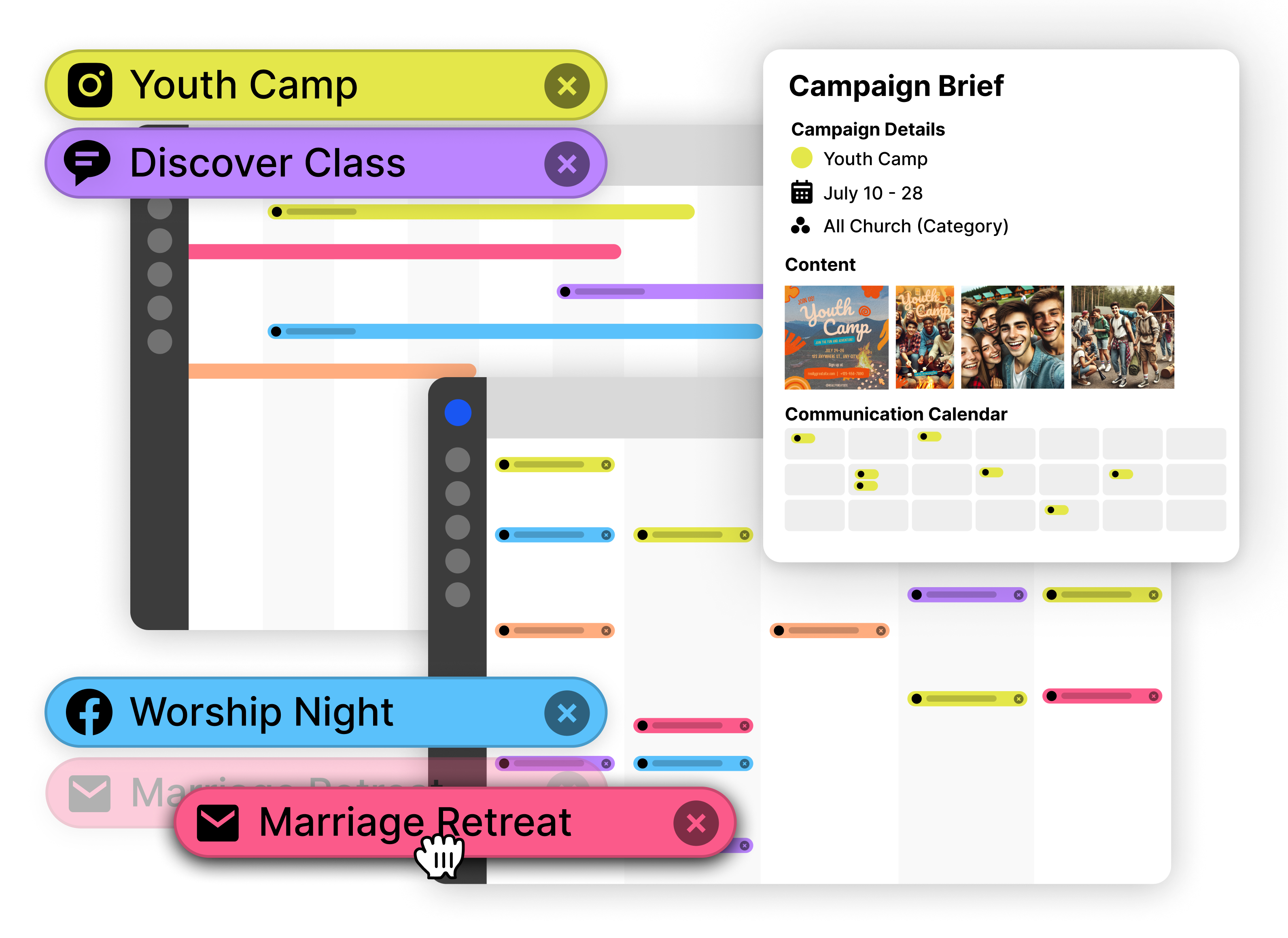
Align emails, social posts, and service announcements in a single view so small teams deliver clear, consistent messages across ministries.

Fewer Steps, Clearer Results

Collaborate across worship, kids, youth, and comms without duplicate work. Schedule once, keep everyone on the same page, and hit every deadline.

Features Built for Small Church Teams

Every feature in Communicate is designed to simplify communication planning for small staff. No complex setup, no overwhelming options—just the tools you need to stay organized.

Features for small teams include simple calendar interfaces, quick content drafting, asset management, and status tracking.

Simple Calendar Interface

See all your communications in one visual calendar—emails, social posts, Sunday announcements, and more. No switching between tools or hunting through spreadsheets. Everything that needs to happen is visible at a glance.

For small teams, this single view eliminates confusion. You can quickly see what's scheduled this week, what's coming up next month, and what still needs attention—all without complex filters or multiple screens.

Quick Content Drafting

Draft announcements, social posts, and email content directly in the calendar. No need to copy-paste between tools or manage separate documents. Write once, schedule everywhere.

Small teams save time by keeping content and scheduling together. When you draft a Sunday announcement, you can immediately schedule it for the right date and assign it to the right person—no extra steps.

Asset Management

Attach images, documents, and links directly to communications. No more searching through email threads or shared drives to find the graphic for this week's social post.

Everything related to a communication lives with it in the calendar. When a volunteer needs to post about an event, all the assets are right there—no hunting required.

Status Tracking

Mark communications as draft, ready, or sent. Filter the calendar to show only what needs attention, so small teams can focus on what matters right now.

With limited staff, knowing what's done and what's pending prevents dropped balls. The status system gives small teams clear visibility without overwhelming detail.

How Small Church Teams Use Communicate

See how small staff with limited bandwidth use Communicate to plan communications efficiently and stay organized.

Small church teams use communication software for weekly planning workflows, coordinating with volunteers, and managing multiple ministries.

Weekly Planning Workflow

A typical week for a small church team using Communicate:

  1. Monday morning: Review the calendar for the week ahead, see what's already scheduled
  2. Draft Sunday announcements based on the week's events and sermon topic
  3. Schedule social media posts for the week, attaching graphics as you go
  4. Assign email newsletter content to a volunteer for drafting
  5. Set reminders for when content needs to be finalized
  6. Friday: Quick review of everything scheduled, make any last-minute adjustments

This workflow takes about 30 minutes on Monday and 10 minutes on Friday—far less time than managing multiple spreadsheets or email threads.

Coordinating with Volunteers

Small teams often rely on volunteers for content creation. Communicate makes this collaboration simple:

  1. Staff creates a communication and assigns it to a volunteer
  2. Volunteer receives notification and drafts content directly in the calendar
  3. Staff reviews the draft, makes edits if needed, then marks it approved
  4. Communication is scheduled automatically based on the date set

Volunteers don't need training on complex systems—they just draft content in the calendar. Staff maintains oversight without micromanaging every step.

Managing Multiple Ministries

Even small churches have multiple ministries that need to communicate. Communicate helps coordinate without chaos:

  1. Worship team schedules service-related announcements
  2. Kids ministry plans their weekly updates
  3. Youth ministry adds their event promotions
  4. All communications appear in one calendar, so you can see potential conflicts
  5. Filter by ministry to focus on specific areas when needed

Small teams can see everything at once or focus on specific ministries. This flexibility prevents overload while maintaining full visibility.

Why Small Teams Choose Communicate Over Spreadsheets

Many small churches start with spreadsheets for communication planning. Here's how Communicate makes the same work easier and more reliable.

Purpose-built tools offer one shared calendar, visual views, asset attachment, status updates, notifications, and collaboration features that spreadsheets lack.

The Spreadsheet Problem

  • Multiple versions get shared via email, causing confusion about which is current
  • No visual calendar view—just rows and columns that are hard to scan
  • Assets live in separate folders, requiring constant searching
  • Status updates require manual cell editing, easy to miss or forget
  • No notifications or reminders—things get forgotten
  • Collaboration means emailing back and forth with attachments
  • No way to see what's scheduled across all channels at once

The Communicate Solution

  • One shared calendar everyone accesses in real time—always current
  • Visual calendar view shows what's happening when, easy to understand at a glance
  • Assets attach directly to communications, everything in one place
  • Status updates are simple clicks, visible to everyone immediately
  • Built-in reminders and notifications keep nothing forgotten
  • Collaboration happens in the calendar—no email threads needed
  • See all channels together or filter by type—full visibility without complexity

Time Savings for Small Teams

Small church teams report saving 3-5 hours per week by switching from spreadsheets to Communicate. That's time they can spend on ministry instead of managing communication logistics. The simple interface means volunteers can contribute without training, and staff can oversee everything without constant checking.

How Small Teams Collaborate in Communicate

Small church teams need tools that enable collaboration without complexity. Communicate gives you shared visibility and simple workflows.

Small teams collaborate through shared calendar access, simple assignment systems, and volunteer-friendly interfaces.

Shared Calendar Access

Everyone on your small team sees the same calendar in real time. When one person schedules a communication, everyone else sees it immediately. No more "did you update the spreadsheet?" questions or confusion about what's planned.

This shared visibility is especially valuable for small teams where people wear multiple hats. The pastor can see what communications are scheduled, the admin can see what needs content, and volunteers can see what they're assigned—all without separate meetings or status updates.

Simple Assignment System

Assign communications to specific team members or volunteers. The calendar shows ownership clearly, so everyone knows who's responsible for what. Small teams can distribute work without losing track of who's handling each communication.

When someone is out sick or on vacation, you can quickly see what they were handling and reassign it. This flexibility is essential for small teams where coverage is always a concern.

Volunteer-Friendly Interface

Volunteers can contribute without learning complex systems. They can draft content, attach assets, and update status—all in an interface that's intuitive and straightforward.

Small teams can leverage volunteer help without spending time training. The calendar is self-explanatory, so volunteers can jump in and contribute immediately. Staff maintains oversight through the shared calendar view.

Getting Started with Communicate for Small Teams

Small church teams can be up and running with Communicate in minutes. Here's how to get started quickly.

Getting started involves signing up, adding upcoming communications, setting up channels, establishing workflows, and beginning to plan ahead.

1

Sign Up and Invite Your Team

Create your account and invite staff members and key volunteers. Everyone gets access to the shared calendar immediately—no complex setup or permissions to configure.

2

Add Your Next Few Weeks

Start by adding communications for the next 2-3 weeks. Don't worry about migrating everything from your old system—just begin with what's coming up. You can add historical data later if needed.

3

Set Up Your Channels

Configure the communication channels you use—email, social media, Sunday announcements, etc. This helps organize your calendar and makes filtering easier.

4

Establish Your Workflow

Decide who drafts, who approves, and who publishes. Use the assignment and status features to create a simple workflow that works for your team size. You can always adjust as you learn what works best.

5

Start Planning

Begin using the calendar for your weekly planning. As you get comfortable, you'll naturally start planning further ahead and using more features. There's no need to learn everything at once—just start with what you need today.

Most small church teams are fully operational within their first week. The interface is designed to be intuitive, so you spend less time learning and more time communicating effectively.

How this topic connects: This page establishes the church communications small teams pillar by explaining how small team systems help limited staff plan communication effectively.

Questions About Small Church Communication Software?

Quick answers about Communicate—the lightweight calendar and church communication tool built for small staff. Plan announcements, schedule posts, and keep every update aligned without complex systems.

Common questions about small church communication software cover software functionality, multi-ministry sharing, avoiding reactive communication, budget considerations, staff bandwidth, volunteer use, setup speed, and maintenance requirements.

Is this just a calendar, or full church communication software?

Communicate is more than a calendar. It’s a lightweight platform for small church teams to plan campaigns, draft content, manage approvals, and schedule across channels—so messaging stays consistent and on time.

Can a small staff and multiple ministries share the same plan?

Yes. Worship, kids, youth, and comms collaborate in one shared calendar. Everyone sees what’s scheduled in real time—eliminating conflicts, duplicates, and last-minute scrambling.

How does this help small church teams avoid reactive communication?

Communications can be planned in context with events and campaigns. Teams can stagger send times, set reminders, and align messaging across channels, which helps small staff communicate effectively without becoming overwhelmed.

Is Communicate good for churches with limited budgets?

Church communication software for small teams replaces multiple scattered tools with one centralized planner. This consolidation is ideal for small staff and tight budgets, reducing the need for multiple subscriptions or tools.

How does small church communication software help with limited staff bandwidth?

Centralizing all communication planning in one calendar allows small teams to see what's scheduled, what needs attention, and what's already completed. This visibility helps limited staff stay organized without juggling multiple tools or spreadsheets, reducing the risk of burnout.

Can volunteers use the church communication tool, or is it just for staff?

Church communication software for small teams is designed to be simple enough for volunteers to use. Volunteers can be granted access to view or edit specific campaigns or communications, which helps small teams distribute workload without overwhelming individual team members.

How quickly can a small church team get started with the communication tool?

Small churches can begin using church communication software within minutes. The interface is intuitive, and teams can start by adding their next few weeks of communications. No complex setup or extensive training is required—teams can sign up and begin planning immediately.

Does the small church communication software require ongoing maintenance?

Church communication software for small teams is cloud-based and maintained by the service provider. Teams don't need to worry about software updates, data backups, or technical maintenance—they can focus on planning communications while the platform handles technical requirements.

Ready to Simplify Small Church Communication?

Communicate is lightweight church communication software built for small teams. Plan announcements, schedule posts, and coordinate ministry updates in one shared calendar—so your church comms stay organized, consistent, and on time without complex systems.

Small church communication software helps teams plan announcements, schedule posts, and coordinate ministry updates in one shared calendar.

Try Communicate Free — Built for Small Church Staff

Plan, approve, and schedule church communications from one simple, shared calendar.

Built for small church teams